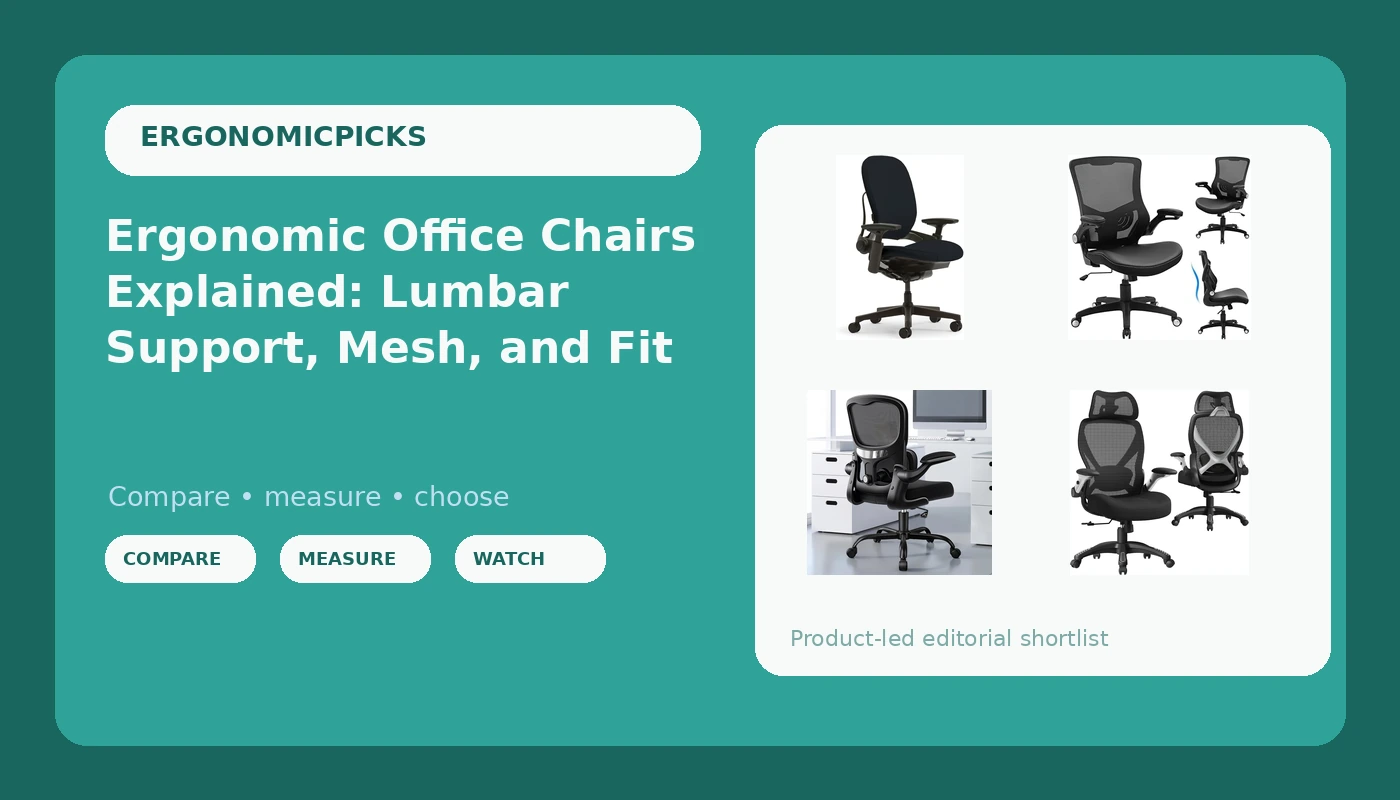
Walk down the office chair aisle and almost every box says ergonomic. Very few of those chairs let you change anything that decides whether hour six is comfortable or miserable. This explainer looks at four ergonomic office chairs at very different points on the price and adjustability scale, from a mesh model with flip-up armrests to a long-running premium chair whose entire design story is back support. The point is not to declare a winner. It is to give you the vocabulary to read a spec sheet and know which adjustments you will actually use, which ones are filler, and which ones are a polite word for a fixed pad.
Related: How to Set Lumbar Support Height So It Stays Put →
Quick answer
Ergonomic is a claim about adjustment, not about cushioning. A chair earns the term when the lumbar support moves and locks where your lower back actually curves, when seat depth matches your thigh length, and when the armrests hold position under the real weight of your forearms. In this group, the Steelcase Leap is the premium chair built around back support, the ELABEST X100 is the one sized for bigger and taller sitters with the widest armrest adjustment claim, the ALLGOD is the breathable mesh option with a stated 300 lb capacity, and the PU leather chair is the compact, easy-wipe pick whose arms fold out of the way. None of them is one-size-fits-all, and each one gives something up.
Four useful options
| Model | Best fit | What stands out |
|---|---|---|
| Steelcase Leap Office Chair, Ergonomic Back Support, Onyx | Buyers who want the longest-established design here | Back support is the stated design focus |
| ELABEST X100 Ergonomic Mesh Office Chair, Big and Tall Home Desk Chair with 5D Flip-Up Arms, Adjustable 3D Lumbar Support, Gaming & Executive Computer Chair | Taller and heavier sitters | Big and tall sizing with 5D flip-up arms |
| ALLGOD Ergonomic Office Chair, Breathable Mesh Ergonomic Desk Chair with Adjustable Lumbar Support, Flip-up Armrests, Computer Chairs Comfortable for Home, Office, Work, 300lbs, Black, Upgrade | Budget mesh with a higher stated capacity | Breathable mesh, flip-up armrests, stated 300 lb rating |
| Office Chair Ergonomic Desk Chair, Computer PU Leather Home Office Chair, Swivel Mesh Back Adjustable Lumbar Support Flip-up Arms Executive Task Chair | Home desks that share space | PU leather seat, mesh back, folding arms |
The premium reference: Steelcase Leap Office Chair, Ergonomic Back Support, Onyx
This is the chair in the group that comes from a company that does office seating and little else, and that history is most of what you are buying. It is the biggest spend here by a wide margin, it is heavy, and if you wanted a mesh back for summer air movement, this configuration is not that. What the money goes toward is the frame and the mechanism, plus a model that has stayed in production long enough to be widely resold and repaired. That resale market matters more than people admit: a used or refurbished Leap from an office liquidation is a normal way to buy this chair, and it changes the math considerably. Choose it when you have decided the chair is furniture you intend to keep rather than a purchase you intend to repeat.
The big and tall pick: ELABEST X100 Ergonomic Mesh Office Chair, Big and Tall Home Desk Chair with 5D Flip-Up Arms, Adjustable 3D Lumbar Support, Gaming & Executive Computer Chair
Big and tall is one of the few labels in this category that means something concrete: a taller back, a wider seat, and a mechanism meant to carry more than the standard version. The 5D and 3D numbers are marketing shorthand, not a standard, and that is the part to interrogate. The useful question is which directions each adjustment moves and whether it locks there. In practice, five-dimensional arms usually add a sliding or rotating element on top of height, depth, and angle, which is genuinely helpful if you alternate between typing and leaning back, and mostly noise if you set the arms once. The mesh back and seat are the right call if heat is your main complaint. The trade-off against the premium chair is track record: this model is newer, so its long-term durability story is shorter, even though it costs less.
The budget mesh option: ALLGOD Ergonomic Office Chair, Breathable Mesh Ergonomic Desk Chair with Adjustable Lumbar Support, Flip-up Armrests, Computer Chairs Comfortable for Home, Office, Work, 300lbs, Black, Upgrade
This is the least expensive chair here, and the stated capacity is higher than most chairs at this end of the market, which is worth noting if two people of different sizes will use it. The honest trade-off with inexpensive mesh is tension. Mesh only breathes the way people imagine when it is pulled tight, and budget mesh is where sag shows up first. A back that has lost its tension stops being a breathable back and becomes a hammock that pushes your pelvis forward, which is the opposite of lumbar support. That does not make this a bad buy. It makes it a chair to buy with a return window, and to think of as a short-cycle purchase rather than a ten-year one. The flip-up arms are the genuinely useful feature: they let the chair slide under a desk that sits lower than a standard office desk, which is the usual problem in a home setup.
The space-saving option: Office Chair Ergonomic Desk Chair, Computer PU Leather Home Office Chair, Swivel Mesh Back Adjustable Lumbar Support Flip-up Arms Executive Task Chair
This is the odd one out, and useful for exactly that reason. A PU leather seat over a mesh back gives you a surface you can wipe down while still moving some air behind you. The trade-off runs two ways: a coated seat is warmer across the whole seat pan than mesh is, which matters in a room without good cooling, and coated materials age by peeling rather than by fading, so what you are really judging is how the upholstery holds up rather than how it feels in month one. The swivel base and fold-up arms suit a desk that has to do two jobs, because folding the arms lets the chair tuck away when the desk becomes something else. Adjustable lumbar support is listed, so the thing to confirm is whether the pad moves in more than one direction and locks where you leave it.
Prices and availability may change. Product images, names, and retailer links must be matched by verified ASIN. Do not state a current price, rating, stock status, or measured result without current evidence.
What "adjustable lumbar support" actually means
Your lower back has an inward curve, and a chair supports it when something fills that curve at the right height and stays there. Two very different mechanisms get sold under the same phrase. The first is a pad on a vertical track: it moves up and down and that is all. The second changes both height and depth, so the support can be pushed forward into the curve or backed off when it feels like a fist in your spine. Only the second one adapts to more than one body shape. The real test is not what the support does when you set it in the morning, it is what it does after you have shifted your weight a dozen times. If it drifted backward or slid down, it was never supporting anything, it was just present. On a chair with a fixed lumbar bump, the only adjustment left is your own posture, which is the thing the chair was supposed to help with in the first place. That is why "ergonomic" stamped on a chair with no lumbar adjustment is the most common lie in this category.
Seat depth, tilt tension, and armrests: the specs nobody reads
- Seat depth. This is the front-to-back length of the seat pan. Too long and the front edge presses behind your knees and cuts off circulation; too short and your thighs carry your weight with nothing under them. A seat that slides, or a model sold in sizes, is how you fix this. Everything else about the chair is secondary if the depth is wrong.
- Tilt tension. This is the resistance you feel when you lean back. Locked tilt holds you upright all day whether you want it or not, and loose tilt lets you slump further than you meant to. You want the range to go light enough to move with you and firm enough to hold you.
- Armrests. They should meet your forearms without lifting your shoulders. Wobbly arms are worse than no arms, because you end up bracing against them, which is how shoulder tension starts. Flip-up arms solve storage, not support, so check that they lock down solidly when they are down.
- Weight rating. If more than one person uses the chair, or if you are near the top of a standard rating, the gas lift is the part that fails first. Compare stated capacities rather than assuming they are all the same.
A five-step way to decide
- Sit in a hard chair, slide back until your back is straight, and measure from the crease behind your knee to your backside. That measurement is the seat depth range you are shopping for.
- Note your desk height and how much clearance you need underneath it. If you need the chair to tuck away, arms that fold or drop low are a requirement, not a bonus.
- Name the one complaint you are solving: aching lower back, heat, shoulder tension, or floor space. Each points to a different chair.
- Check the lumbar mechanism before anything else. It should move in two directions and hold its position, not just slide and settle.
- Divide the cost by the number of years you realistically expect to keep the chair. That number, not the sticker, is what you are comparing between these four.
Setting the chair up so the adjustments matter
- Set seat height first, so your feet are flat and your hips are level with or slightly above your knees.
- Set seat depth before lumbar support. If the pan is wrong, no lumbar pad lands in the right place.
- Move the lumbar support into the curve of your lower back, not the middle of your back. If it feels like pressure on your spine rather than support under it, it is too low, too high, or too far forward.
- Set the armrests to just meet your forearms with your shoulders relaxed. If you have to lift your shoulders to reach them, they are too high.
- Re-check everything after a week. Most people set a chair once and then adapt their body to it, which is exactly backwards.
Which option should you choose?
Choose the Steelcase Leap Office Chair, Ergonomic Back Support, Onyx when back support is your priority and you have decided the chair is long-term furniture worth buying used or refurbished if the new price is out of reach. Choose the ELABEST X100 Ergonomic Mesh Office Chair, Big and Tall Home Desk Chair with 5D Flip-Up Arms, Adjustable 3D Lumbar Support, Gaming & Executive Computer Chair when you are tall or heavy enough that standard chairs run out of seat and back height before they run out of adjustments. Choose the ALLGOD Ergonomic Office Chair, Breathable Mesh Ergonomic Desk Chair with Adjustable Lumbar Support, Flip-up Armrests, Computer Chairs Comfortable for Home, Office, Work, 300lbs, Black, Upgrade when budget and breathability lead and you accept a shorter service life in exchange. Choose the Office Chair Ergonomic Desk Chair, Computer PU Leather Home Office Chair, Swivel Mesh Back Adjustable Lumbar Support Flip-up Arms Executive Task Chair when the desk doubles as something else and you want wipeable upholstery with arms that fold away.
One caveat applies to all four. A listing cannot tell you whether a lumbar pad locks, whether an armrest wobbles under load, or whether the mesh will still be tensioned in year three. Sit in the chair if there is any way to do that, and if there is not, buy from a seller whose return window you would actually use.
The bottom line
Ergonomic office chairs are a matching problem, not a ranking problem. The chair that works is the one whose seat depth, lumbar height and depth, and armrest adjustment line up with your body and your desk, and the only way to know which of these four is that chair is to check the mechanisms and, where possible, sit in it. Start with the adjustments you will change every day, weigh the stated capacity against who will actually sit there, and price the chair per year rather than per box. A chair you replace in two years was never the cheaper one.